The Party White
4WB26L White 4 Seat Lithium Golf Cart Rental Guide, Miramar Beach And Destin
White paint, coral sunsets, four seats and a sound system people actually notice. 4WB26L is the one groups book when the drive to dinner is half the point. Street legal Low Speed Vehicle, Florida tagged, cleared for public roads posted 35 mph or less across Okaloosa and Walton Counties. Do beach better.
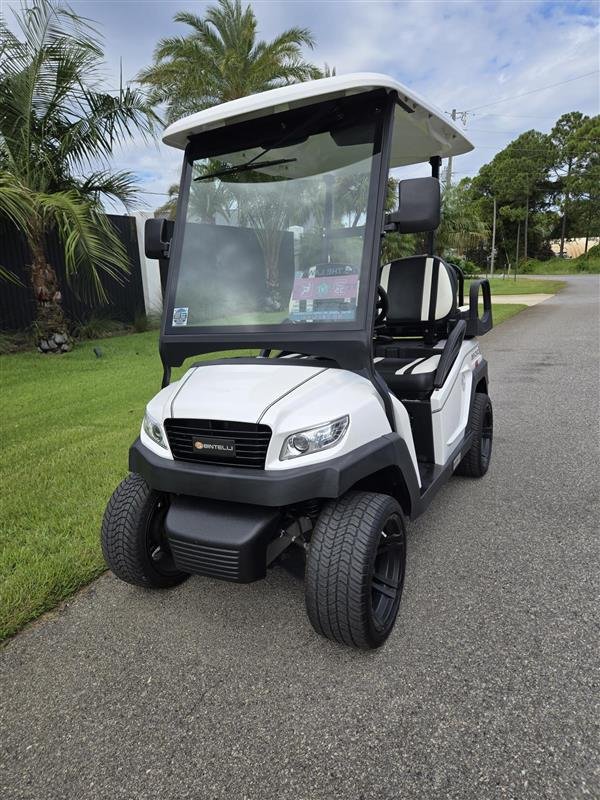
Unit 4WB26L. Match the windshield number before you unlock anything.
01
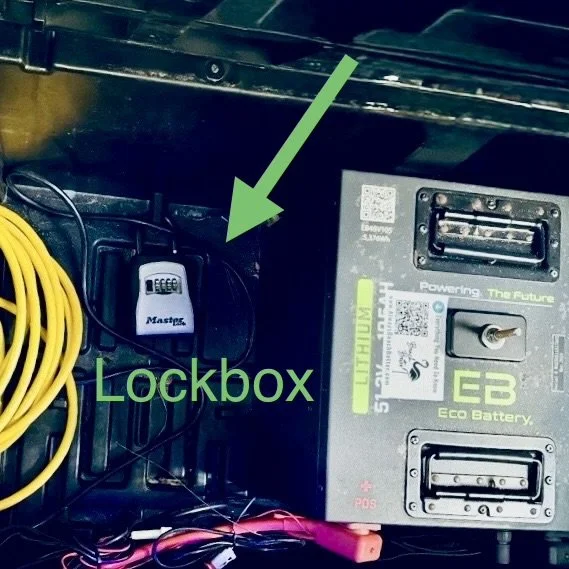
Find The Box, Then The Key
The front seat cushion lifts straight up. Underneath it, sitting on the floor next to the battery, is a small black lockbox. That is the entire puzzle, and it takes about ten seconds once somebody has told you.
- Lift the front seat cushion. The box is on the floor underneath, alongside the battery. Units in our fleet differ, so go by this page rather than by the last one you rented.
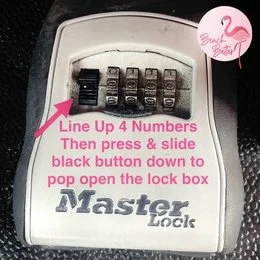
- Line the four digits up straight. They sit half a notch off more often than you would expect, and a half notch reads as a wrong code.
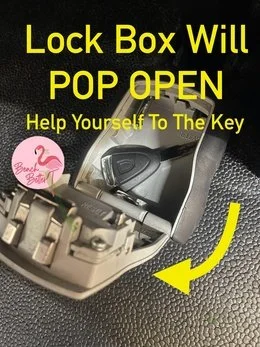
- Slide the black button down. The lid pops and the key is sitting inside.
No code in your texts
Codes go only to drivers approved on the signed agreement. The primary driver received it by text and email when the rental started, and by email again the evening before. Check spam, then ask whoever booked. If the person hunting for the code is not on the agreement, that is the one person who cannot legally drive it.
02
Who Is Allowed To Drive This
This is the rule that costs groups the most money when they get it wrong, so it goes near the top rather than buried in a list.
- Two drivers are included. Both are named on the agreement and both e-sign before the rental starts.
- Anyone else is $15 and signs online first. It takes about two minutes on a phone at the kitchen counter. Use the Add A Driver page, and you can do it mid trip when plans change.
- Every driver is 22 or older with a valid license and active auto insurance in their own name. Under Florida Statute 627.7263 that personal policy is primary during the rental, which is why it is not optional.
- An unapproved driver is prohibited use. It voids coverage and moves responsibility for everything that follows onto the renter. One cousin taking a quick spin is the whole exposure.
- Signatures are electronic and they count. Florida Statute 668.004 gives an e-signature the same force and effect as ink on paper.
The rest of the fine print
Fees, damage terms, prohibited uses and cancellation live in your signed agreement and in the Terms, Conditions and Policies. Road law is on the Florida Golf Cart And LSV Laws page, and optional Renter's Collision Protection at $39.50 per driver per day with a $500 deductible is explained on the Renter's Collision Protection page. This page is part of the Renter Guide your agreement references, sent to you in writing at booking and again the day the rental began.
03
Before The First Turn
4WB26L sits low rather than lifted, which lowers the center of gravity and makes it easy to step into. It is still a licensed motor vehicle weighing a fraction of your car, with none of the parts that make a car forgiving.
Rollover warning: narrow track, open sides
A Low Speed Vehicle tips rather than slides. Double your speed into a corner and the sideways force roughly quadruples. Every rollover we hear about traces to the same three moves: turning too fast, swerving to avoid something, or catching a curb or a soft shoulder mid turn. Brake before the corner, roll through it, straighten, then accelerate.
No airbags, no crumple zones, no doors, no roof cage. The seat belt is the entire safety system, and an unbelted passenger leaves the vehicle sideways at whatever speed you were carrying.
- Four seats, four belts, four riders. Kids count as people. No laps, no standing, nobody on the rear step while it moves, arms and legs inside.
- Bring your own car seat. Florida Statute 316.613 requires a child through age 3 in a separate carrier or an integrated child seat, and a booster does not satisfy it. A child aged 4 or 5 needs a carrier, an integrated seat or a booster. We do not supply them.
- Phone down in motion. Handheld and hands free are both out, and Florida DUI law applies here exactly as it does in a car.
- Walk around it first. Tires, belts, lights, body. Text a photo of anything that looks wrong to (850) 830-4699 before you pull out. In a crash: 911, stay, report, then text us.
- Parking brake is the only park gear. Set it every time, wheels toward the curb on a slope, key in your pocket.
04
Starting It
- Belts, then key.
- Tow switch on RUN, not TOW. Look near the battery compartment under the seat, or on the front passenger side near the glovebox. On TOW the vehicle is dead on purpose.
- Key twice to the right. One click lights the dash, two wakes the drive system.
- F or R at a complete stop. Then ease on. Lithium torque is instant and there is no engine noise to warn the people behind you.
- Headlights, blinkers, horn. Public roads, same habits as a car.
05
Charging, And The One Cord Rule
Any standard household outlet works, the same one you would use for a lamp or a phone charger. No special plug, no adapter, no installation. About eight hours takes it from low to full, and a full pack runs roughly 20 to 22 miles depending on load, stops and how hard the lights and sound are working.
Extension cords: 12 gauge or heavier, outdoor rated
Never charge through an indoor rated cord. The heat produced during charging can damage an indoor cord and create a fire risk. If you need to reach an outlet, use a 12 gauge or heavier cord rated for outdoor use, and nothing lighter.
- Plug in nightly, even after a short run. Habit beats memory on vacation.
- One outlet per vehicle. Two carts on one circuit trips the breaker overnight and you wake to nothing.
- Older rental house, clear the circuit. Unplug the coffee maker and the television from that outlet first.
- Both cord ends glow when it is charging. Dark ends mean a dead outlet, not a dead cart.
- The cord travels with the vehicle. Left behind at the house, the first low battery out on 30A is a $200 tow.
The round ECO gauge sits near the glovebox on the passenger side and reads honestly across the whole pack. A pack falls from half to empty much faster than from full to half, so treat fifty percent as your turnaround, not your cushion.
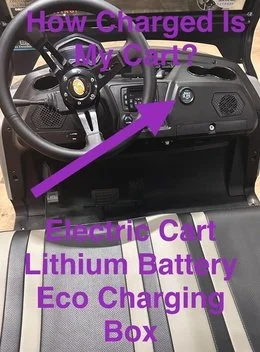
Back at 90 percent or better, plugged in
House rule on every electric we rent. Handing it back under 90 percent is a $100 charge, and a low gauge is not spare range.
06
Sound System And Glow Lights
Turn the key to on, open Bluetooth on your phone and select this cart's speaker. Once paired, music plays straight from your phone. Keep the volume where you can still hear a horn or a siren, and drop it through residential streets after dark.
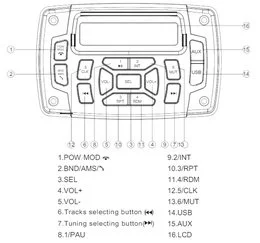
For the glow system, wake the dash with the key, then press Power on the small silver remote tethered to the dashboard. Mode runs solid, seven chase patterns, pulse, scan, strobe, fade, S.O.S and the music and voice reactive modes. Color gives red, hot pink, pink, purple, orange, yellow, green, teal, blue, white and two cycling options. Speed has five levels.
Remote clicking, nothing lighting
Low on the dashboard there is a black switch with a blue indicator. Flip it ON, because it feeds the entire glow system. Still dark, confirm the dash is lit by turning the key. Leave the other toggles alone.
Glow lights are decoration, not headlights. Use the real ones after sunset.
07
Where You Can Take It
4WB26L is titled, tagged and insured as a Low Speed Vehicle under Florida Statute 320.01 and 49 C.F.R. 571.500. Florida Statute 316.2122 puts it on public roads posted 35 mph or less. Around Miramar Beach that means Scenic Gulf Drive, and east of here it means County Road 30A.
Why this coast is drivable at all
None of this was easy to reach until fairly recently. The Highway 331 bridge went in during the 1930s, and the Coast Guard put a station at Grayton Beach in 1942. Before the bridge, most of what you can now cover in a twenty minute cart ride was a day's work.
US-98, the beach, the dunes, dune walkovers, sidewalks and trails are all off limits, including crossing US-98 anywhere other than a legal signalized intersection. Private communities set their own rules and several along 30A and inside Sandestin do not allow rental vehicles at all, so check your address on the Neighborhood Rules page. Park in marked spaces only and set the brake every time.
08
AirTag, Arrival And Return
Every vehicle carries an Apple AirTag that cannot be removed, which is how we reach you quickly when something goes wrong. If your phone flags an unknown AirTag traveling with you, that is ours, and the windshield ID tells you which vehicle it belongs to.
It arrives clean and charged by your start time, sometimes early, because drivers route by geography rather than the clock. That is how delivery stays free. Early is yours to enjoy. If nobody is home we park it neatly out of the way.
- Charge to 90 percent or better and leave it plugged in. Under 90 is a $100 charge.
- Key back in the lockbox, digits scrambled. Cord back in the vehicle.
- Text (850) 830-4699 when it is ready. We collect at the end of the rental or shortly after.
Charges worth avoiding: key or remote $50, charging cord $50, stranded tow $200, late return $100 an hour, citations passed through plus a $35 admin fee.
09
If Something Is Off
Will not charge
Dark cord ends point at the outlet, and a tripped GFI is nearly always the answer. Reset, replug, watch for the glow. Still nothing, unplug for thirty seconds and try again. Two carts need two circuits.
Will not turn on or move
Tow switch on RUN. Key twice right. Parking brake fully off. Selector all the way into F or R.
Anything that feels wrong
Soft tire, steering that pulls, a brake pedal that goes long. Park somewhere safe and legal and text before you drive further.
Photo first, paragraph second
Nine times in ten a picture or a ten second video solves it on the spot, and it is the first thing we will ask for anyway.
10
Questions We Get
How do I connect my phone to the golf cart Bluetooth speakers?
Turn the key to on, open the Bluetooth menu on your phone and select this cart's speaker from the list. Once paired, music plays directly from your phone. If the speaker does not appear, confirm the dash is lit, then turn Bluetooth off and on again on the phone before trying a second time.
What kind of outlet does a golf cart charger need, and can I use an extension cord?
Any standard household outlet, the same one you would use for a lamp or a phone charger. No special plug or adapter and no installation. If you need an extension cord, use a 12 gauge or heavier cord rated for outdoor use. Never use an indoor rated cord, because the heat produced during charging can damage it and create a fire risk.
Can I add another driver after the rental has already started?
Yes. Two drivers are included and anyone else is $15. They complete and e-sign the agreement online through the Add A Driver page before they take the wheel, which takes a couple of minutes on a phone. Nobody may drive before that signature exists, because an unapproved driver is prohibited use and voids coverage.
How many people can legally ride in a 4 seat street legal golf cart in Florida?
Four, because seat belt count is the limit. Every rider needs a belted seat, children included, and there is no legal allowance for laps, standing or riding the rear step. A fifth person is both a citation risk and the exact circumstance that turns a minor incident into a serious one.
What happens if I get a ticket while driving the rental?
Citations issued during your rental are your responsibility. They come to us as the registered owner and are passed through to the renter along with a $35 administrative fee. On a public road this is a motor vehicle, so stop signs, signals, right of way, the handheld phone ban and DUI law all apply.
Is it fine to leave the cart parked outside overnight in salt air?
Yes, that is normal here and our vehicles live in it. Park it in a marked space, set the parking brake, plug it in and take the key with you. Sand and salt spray are expected wear and are never charged back to you. What does get charged is a missing key or cord at $50 each.
 Add On
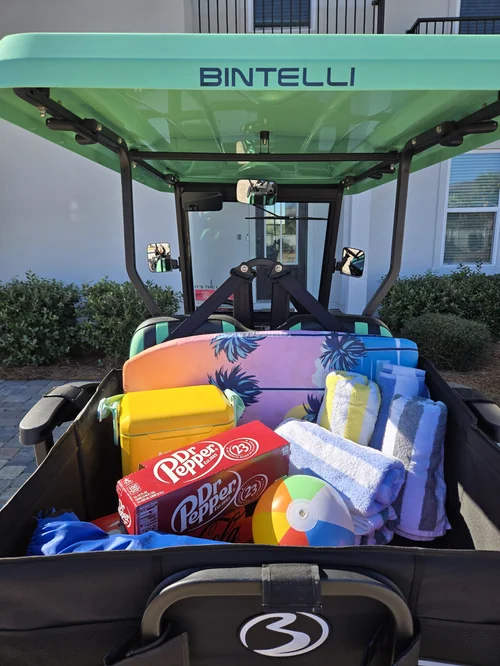
Add A Storage Box
Cooler, chairs and towels locked in the back instead of on four sets of knees.
Add Storage Add On
Add A Driver
Two are included. Anyone else is $15 and e-signs online before they drive.
Add DriverText (850) 830-4699 with any question before you drive. We are at 76 N Holiday Rd, Miramar Beach, FL 32550, next to the Cumberland gas station, and at Rentals@alwaysbeachbetter.com.