The Lime One
L4LB41L Lime Green 4 Seat Electric Golf Cart Rental Guide, Miramar Beach
Good news: you will never lose this one in a parking lot. L4LB41L is lime green, lifted, four seats, and quiet as a whisper on lithium. It is also a real street legal Low Speed Vehicle with a Florida tag, so it goes on actual roads, not just the resort loop. Here is everything, in the order you will need it.
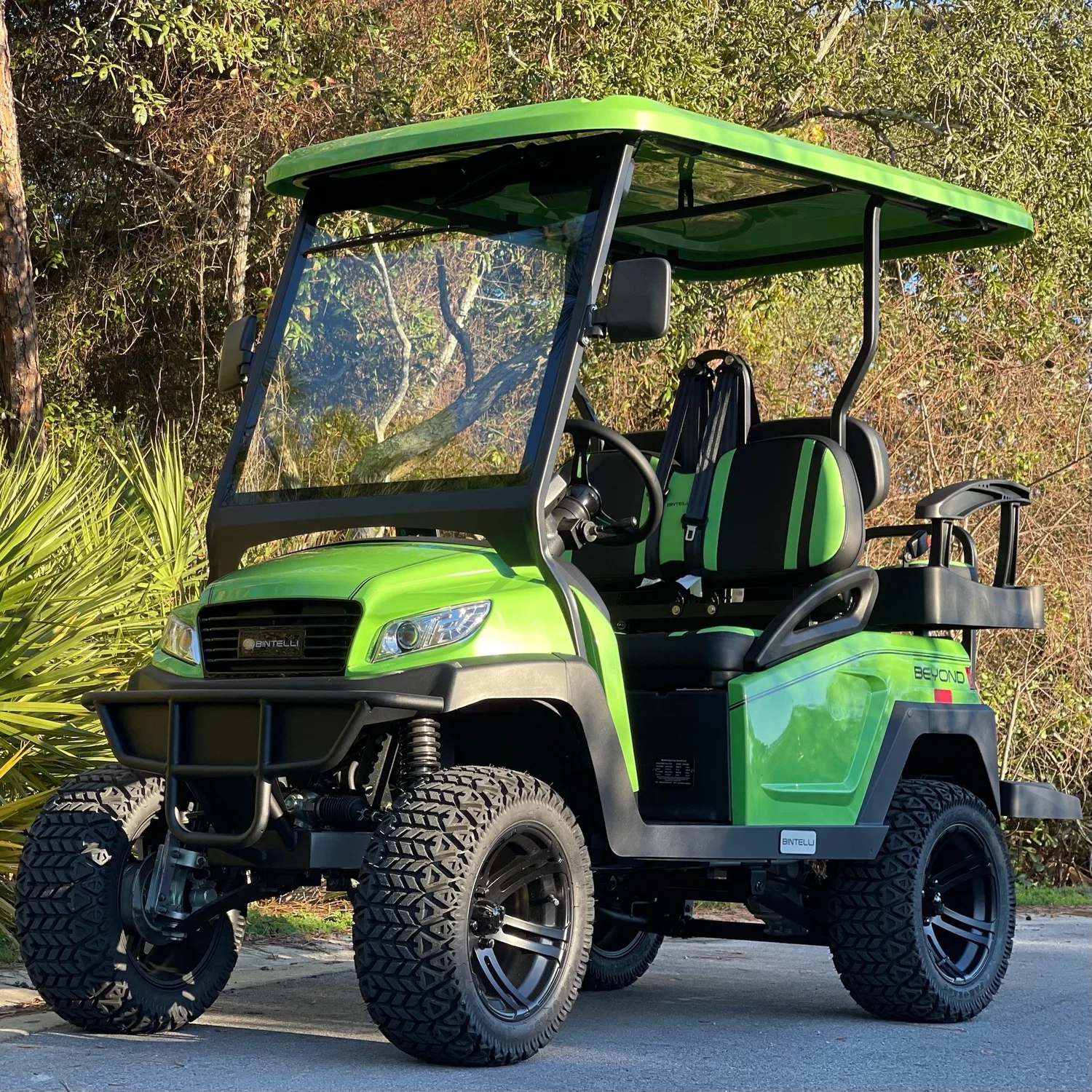
Unit L4LB41L. Tell your group to look for the lime one.
Two minutes to rolling
- Lift the front seat, dial your code, grab the key.
- Everybody sits down and buckles up. Four seats, four people.
- Tow switch on RUN, key twice to the right, pick F, ease off.
01
The One Minute Safety Talk
We would rather say this once, clearly, than have you find it out the hard way on Scenic Gulf Drive. This is a licensed motor vehicle. It is also light, tall and open, and it behaves nothing like the SUV you drove down in.
Take the turns slow. That is the whole warning.
A Low Speed Vehicle weighs a fraction of what a car weighs, rides on a narrow track, and this one is lifted on top of that, so it leans and tips where a car would just grip and go. The push you feel in a corner roughly quadruples when you double your speed. Nearly every rollover comes from one of three moves: taking a turn too fast, jerking the wheel to dodge something, or clipping a curb or a soft sandy edge mid turn.
Brake before the corner. Roll through it. Straighten out, then go. Same rule on wet pavement, shell driveways and painted crosswalks.
- Four seats, four belts, four humans. Nobody on a lap, nobody standing, nobody perched on the back. Arms and legs stay inside. There are no doors to catch anyone.
- No airbags, no crumple zones, no roof cage. The belt is the entire safety system. An unbelted rider can come out in a hard stop that a car would shrug off.
- Drivers: 22 or older, licensed, insured in their own name, and signed onto the agreement before the trip starts. That is who gets the lockbox code, and that is who is allowed behind the wheel. Anybody else driving is prohibited use, which kills coverage and lands the responsibility on the renter.
- Kids ride belted, in the back. Florida Statute 316.613 requires a child through age 3 in a separate carrier or an integrated child seat, and a booster does not count. A child aged 4 or 5 needs a carrier, an integrated seat, or a booster. Nobody rides in a driver's lap, ever, not even for a photo.
- Phone down while you are moving. Handheld or hands free, it is off limits while this vehicle is in motion. Pull over somewhere safe and legal first.
- DUI law applies here exactly like it applies to your car. If the group has been at the beach bar, hand the key to someone approved and sober.
- Give it a quick once over before the first drive. Tires, belts, lights, body. Anything looks off, text a photo to (850) 830-4699 before you pull out. If there is a wreck, call 911, stay put, report it, then text us.
Where the fine print lives
Fees, damage terms, prohibited uses and the cancellation policy are all in your signed agreement and in the Terms, Conditions and Policies. The road law is on the Florida Golf Cart And LSV Laws page. This page is part of the Renter Guide your agreement points to, it was emailed and texted to you at booking and again the morning your rental started, and every approved driver is expected to read it before driving.
02
Springing The Key Loose
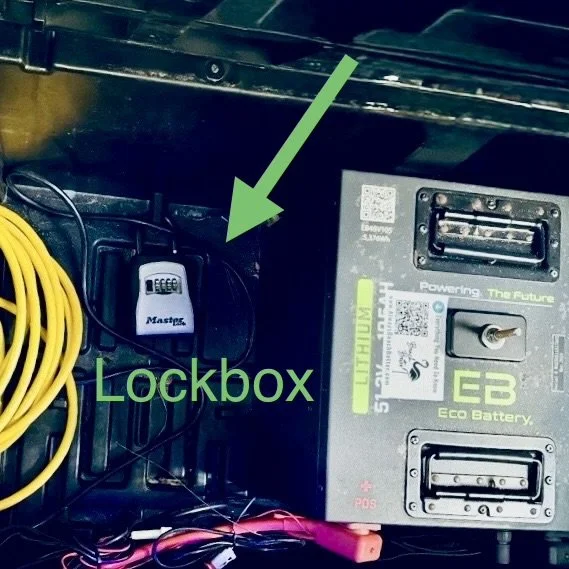
This one hides its lockbox under the front seat, right by the battery. Lift the seat, the box is looking right at you.
- Pop the front seat up. The whole cushion lifts. The lockbox sits alongside the battery.
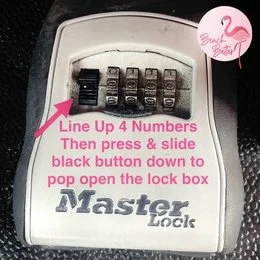
- Roll your four digits into a straight line. Take your time, they like to sit half a notch off.
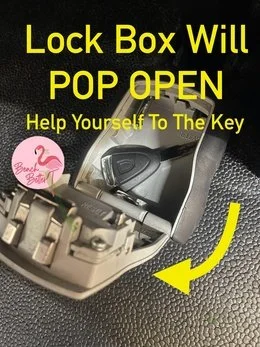
- Push the black button down and the lid jumps open. Key is right inside. Drop the seat back down before you drive off.
Code did not show up?
It went to the primary driver by text and email when the rental started, and by email again the night before. Spam folder first, then ask whoever booked the trip. We only hand codes to drivers who are approved on the agreement, so we cannot pass one along to a friend or a cousin who is not on it.
03
Waking It Up
Two things account for almost every "it will not start" text we get, and both take five seconds to rule out.
- Find the tow switch and make sure it says RUN. It hides near the battery under the seat, or on the passenger side by the glovebox. Parked on TOW, this thing is deliberately dead.
- Turn the key twice, not once. Click one lights the dash. Click two wakes the motor. Half the fleet's mystery breakdowns are a single click.
- Choose F or R, but only at a dead stop. Never swap direction while it is still rolling.
- Squeeze the pedal, do not stomp it. Electric power comes on instantly and silently. Give yourself the first block to get a feel for it.
- Lights, blinkers and horn work like a car's. Use them. Drivers around here are watching for cars, not for you.
It has no park gear
Nothing holds it on a slope except the parking brake. Set it every single time you get out, point the wheels at the curb on any incline, and take the key with you.
04
Feeding It Overnight
One job at the end of the night: plug it in. Regular wall outlet, no adapters, about eight hours to go from low to full. Top it off any time it is sitting in the driveway too. Lithium does not mind.
- Make it part of the bedtime routine. Sunscreen off, cart plugged in. Even after a five minute run for ice cream.
- Its own outlet, please. Two vehicles sharing one circuit will trip the breaker at two in the morning. If you only have one outlet, take turns.
- Older rental house? Clear the circuit first. Coffee maker and TV unplugged from that outlet before the charger goes in.
- Both cord ends should glow. That glow is your receipt. Dark ends mean a dead outlet and a very quiet morning.
- The cord travels with the cart. Not the condo, not the garage shelf. A dead pack at the far end of 30A turns into a $200 tow.

Bring it back at 90 percent, still plugged in
That is the deal on every electric in the fleet, and under 90 costs $100. Lithium stays flat and confident right up until it does not, so an almost empty gauge is not a reserve tank.
05
How Much Juice Is Left
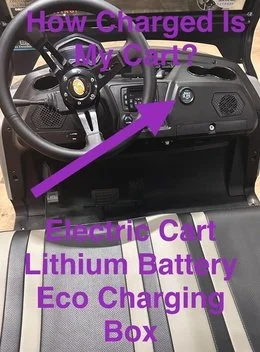
Round gauge, passenger side, just above the glovebox. Lithium tells the truth the whole way down, so believe the needle. Check it before you head out for dinner, not on the way home from it.
06
Making It Glow
Lime green by day, whatever color you want after dark. Turn the key until the dash lights, then find the little silver remote tethered to the dashboard and hit Power.
- Mode runs through solid, seven chase patterns, pulse, scan, strobe, fade, S.O.S, plus music and voice modes that dance to whatever you are playing.
- Color gives you red, hot pink, pink, purple, orange, yellow, green, teal, blue, white, and two cycling options.
- Speed has five settings, from lazy fade to full party.
Remote pressing but nothing glowing?
Low on the dash there is a black switch with a blue dot. Flip it ON, that is the one that feeds the lights. Still dark? Make sure the dash itself is lit. Leave the other toggles alone, they are doing their job.
One thing the glow does not do is replace headlights. It makes you pretty, not visible. After sunset run your actual headlights and use your blinkers, because the folks walking back from dinner in dark T shirts are not looking for you.
07
Pairing Your Music
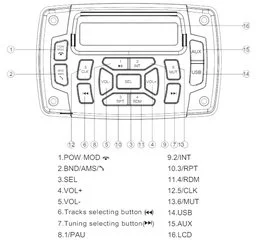
Key to on, open Bluetooth on your phone, tap this cart's speaker, done. It stays paired for the week. Keep it at a level where you can still hear a siren or somebody yelling, and turn it down through the neighborhoods after dark. The people who live here year round appreciate it more than you know.
08
Where Lime Goes, And Where It Does Not
L4LB41L is titled, tagged and insured as a Low Speed Vehicle under Florida Statute 320.01 and 49 C.F.R. 571.500, which puts it legally on any public road posted 35 mph or less under Florida Statute 316.2122. Around here that is Scenic Gulf Drive through Miramar Beach and Destin, and County Road 30A through Santa Rosa Beach.

The hard no list
US-98, the big highway, is off limits everywhere, including crossing it anywhere except a real signalized intersection. So are sidewalks, beach walkovers, dune trails and the sand. A lifted cart looks like it wants to go on the beach. It does not, and it will bury itself trying.
And check your neighborhood
Communities write their own rules on private roads, and a handful along 30A and inside Sandestin do not allow rental vehicles at all. Look your address up on the Neighborhood Rules page before you plan the day, and obey whatever the gate or the guard tells you once you are inside.
09
Odds And Ends
Yes, there is an AirTag
Every cart carries one and it does not come out. It is how we find you fast when something goes wrong. If your iPhone pings you about an unknown AirTag riding along, that is ours. The ID is L4LB41L, same as the windshield.
Your week, start to finish
It arrives clean and charged by your start time, sometimes early, because our drivers run a geographic route rather than a clock. Early is yours to enjoy. If nobody is home yet we tuck it neatly out of the way and keep moving.
- Charge to 90 or better and leave it plugged in. Anything under 90 is a $100 charge.
- Key back in the lockbox, digits scrambled. Cord back under the seat where you found it.
- Text (850) 830-4699 that it is ready. We come at the end of your rental or shortly after, depending on the route that day.
Things that cost money and are easy to avoid: lost key or remote $50, missing cord $50, stranded tow $200, late return $100 an hour, and any ticket passed through plus a $35 admin fee. The rest lives in the Terms.
10
When It Sulks
Cord ends are dark
Breaker first, almost always a tripped GFI. Reset it, plug back in, look for the glow. Nothing? Unplug, count to thirty, try again. Two carts at the house means two separate circuits, no exceptions.
Dead silent when you turn the key
Tow switch on RUN. Key twice right. Parking brake off. Direction selector actually in F or R and not sitting in the middle. That is the checklist, in that order.
Something feels wrong
Soft tire, wandering steering, a brake pedal that goes long, a warning light. Park it somewhere safe and legal and text us. Do not push on and hope.
Photo first. Seriously.
Nine times out of ten a picture or a ten second video solves it on the spot. It is the first thing we are going to ask for, so send it with your first text and skip a round trip.
11
Things People Ask Us
How many people can ride in a 4 seat golf cart rental?
Four. One person per seat, one belt per person, and that includes kids. No lap riding, no standing, nobody on the back step while it is moving. Going over the rated capacity is illegal on Florida public roads and puts the liability squarely on the renter.
Are lifted golf carts safe?
They are safe when you drive them like the tall, light vehicles they are. The lift kit and bigger tires raise the center of gravity, which means a corner taken fast or a sudden swerve can put it on its side where a car would simply grip. Slow before turns, keep everyone belted, stay off soft shoulders, and it is a great ride.
Is L4LB41L street legal in Florida?
Yes. It is a Low Speed Vehicle under Florida Statute 320.01 and 49 C.F.R. 571.500 carrying Florida plate 55BVQV, a VIN, a title, current registration and insurance. Florida Statute 316.2122 allows it on public roads posted 35 mph or less. It is never allowed on US-98.
What roads can a golf cart legally use in Destin and Miramar Beach?
Any public road posted at 35 mph or less, which in practice means Scenic Gulf Drive through Miramar Beach and Destin and County Road 30A through Santa Rosa Beach. Not US-98, not the beach, not sidewalks, not trails. Neighborhoods can be stricter than the state, so check your address first.
Who is allowed to drive it?
Anyone 22 or older with a valid license and active auto insurance in their own name who is listed and approved on the signed rental agreement before the rental begins. Two drivers come with the rental and extras are $15 each, approved online ahead of time. Lockbox codes only go to approved drivers.
How long does it take to charge?
Roughly eight hours from low to full on an ordinary wall outlet. Plug in every night and any time it is parked during the day, and confirm both ends of the cord are glowing before you walk away.
 Add On
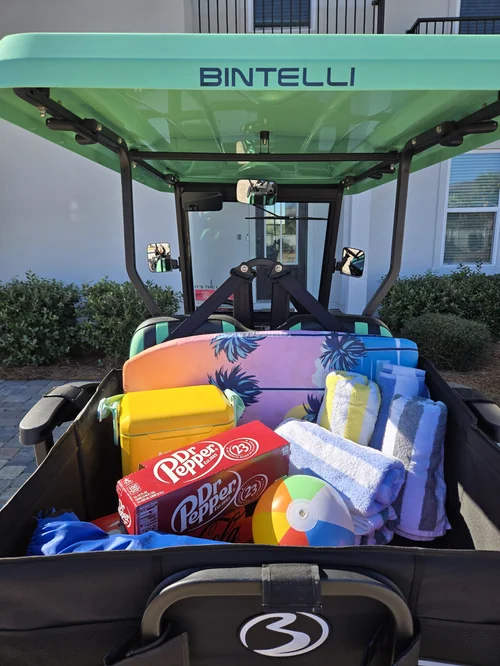
Add A Storage Box
Four seats fill up fast. Chairs, towels and the cooler ride in back instead of on somebody's knees.
Add Storage Add On
Add A Driver
Two are included. Anyone else is $15 and signs online in about three minutes, before they drive.
Add DriverText (850) 830-4699 with anything at all before you drive. We are at 76 N Holiday Rd, Miramar Beach, FL 32550, next to the Cumberland gas station, and at Rentals@alwaysbeachbetter.com.