Vehicle Guide, Unit LNB08L
LNB08L Navy Blue 6 Seat Long Range Electric Golf Cart Rental Guide, 30A And Miramar Beach
LNB08L is a navy blue Bintelli, six seats, lifted, carrying the longest range lithium pack in the fleet. It is the one people take the length of 30A and back without thinking about the gauge. Street legal Low Speed Vehicle with a Florida plate, VIN, title, registration and insurance, cleared for public roads posted 35 mph or less across Okaloosa and Walton Counties. Lockbox, startup, charging, lights, sound and the roads you can legally use are all below.
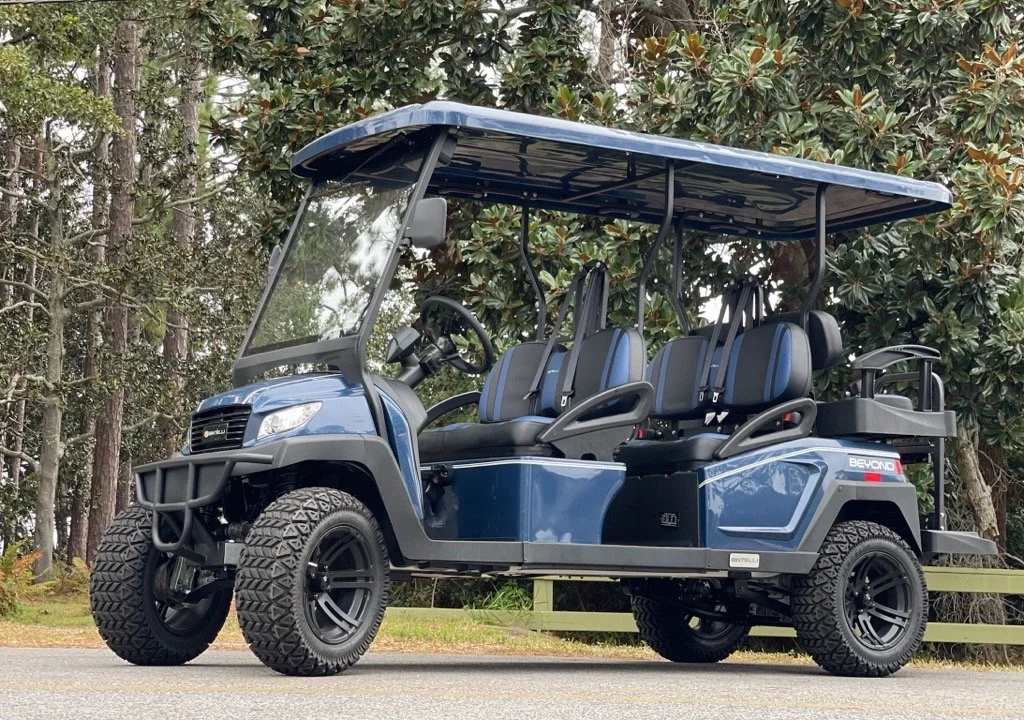
Your vehicle, LNB08L. The windshield number is how we find you fast.
- Windshield ID
- LNB08L
- Florida Plate
- FTJT26
- Color
- Navy Blue
- Seats
- 6
- Power
- Long range lithium
- Brand
- Bintelli
- Height
- Lifted
- Lockbox
- Under the driver's seat
01
Read This Before You Turn The Key
This is a street legal motor vehicle, not a golf course buggy. Long range means longer days out, which means more turns, more traffic and more chances to get it wrong. Every approved driver should read this section before taking the wheel.
Rollover warning
A Low Speed Vehicle weighs a fraction of what a passenger car weighs, rides on a narrow track, and sits higher still because this unit is lifted. It tips rather than slides. The sideways force in a turn climbs with the square of your speed, so a corner taken at twice the speed pushes roughly four times as hard. Six riders aboard raises the center of gravity further. Rollovers happen three ways: turning too fast, swerving suddenly, or catching a curb, soft shoulder, sand or a driveway edge mid turn.
Slow down before the turn, not in the middle of it. Straighten the wheel before you accelerate again. Take driveways, shell and gravel lots, wet pavement and painted crosswalks slower than feels necessary.
What this vehicle does not have
No airbags. No crumple zones. No doors. No roof structure designed to protect occupants in a rollover. Nothing holds a person in except the seat belt they are wearing, and an unbelted rider can be thrown out in a turn or a stop that a car would shrug off. Braking distance is longer than you expect, and six aboard changes both the braking and the balance.
- Six seats, six belts, six people. Everyone seated and belted, hands and feet inside. No standing, no laps, no sitting on seat backs, no one on the rear step.
- Only approved drivers may operate it. Every driver must be 22 or older, hold a valid license, carry their own active auto insurance, and be listed and approved on the signed rental agreement before the rental begins. Lockbox codes go only to approved drivers. Anyone else driving is prohibited use, which voids coverage and shifts responsibility to the renter.
- Watch the edges. 30A has sandy shoulders that drop away from the pavement. Dropping a wheel off the edge while turning is how a lifted vehicle ends up on its side. If a wheel leaves the pavement, ease off, hold the wheel straight, and come back on gently.
- Do the walkaround. Before the first drive, look at the tires, seats, belts, lights and body. Text a photo of anything that looks wrong to (850) 830-4699 before you pull out.
- Belts and child restraints. Florida Statute 316.613 requires that a child through age 3 ride in a separate carrier or an integrated child seat, a booster is not sufficient, and a child aged 4 or 5 ride in a separate carrier, an integrated child seat, or a booster. Never let a child sit in a driver's lap or steer.
- Phones stay down while moving. All phone and device use while this vehicle is in motion is prohibited, handheld and hands free alike. Stop in a safe, lawful place first.
- Alcohol. Florida DUI law applies to this vehicle exactly as it applies to a car.
- If you are in an accident. Call 911, stay at the scene, report it, then text (850) 830-4699.
The full rules live in the agreement
Your signed rental agreement and the Terms, Conditions and Policies govern this rental, including every fee, the damage and collision terms, prohibited uses and the cancellation policy. Road law is spelled out on the Florida Golf Cart And LSV Laws page. This page is part of the Renter Guide referenced by your rental agreement. These instructions were sent to you in writing when you booked and again the day your rental began. Every approved driver is expected to read them before driving.
02
Get The Key Out Of The Lockbox
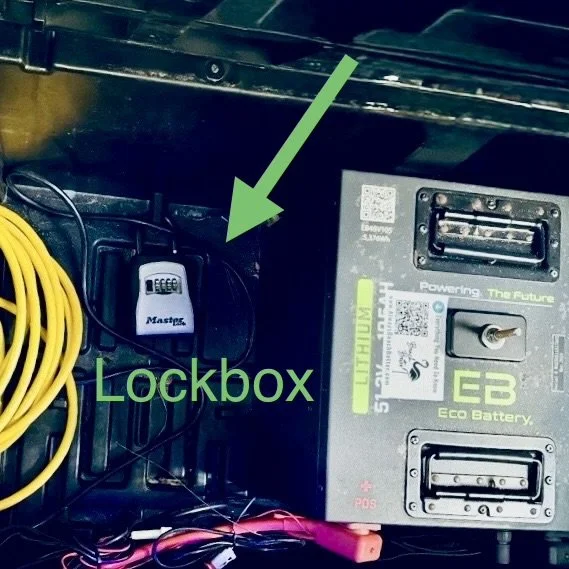
On LNB08L the lockbox is mounted under the driver's seat and you reach it from the middle row. No seat to lift, just reach under.
- Reach under the driver's seat from the middle row. The box is mounted underneath, facing back toward you.
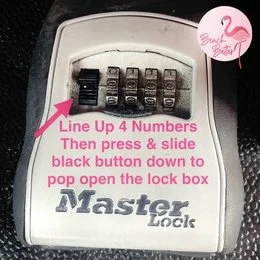
- Line up your 4 digit code. Roll the digits until they read straight across.
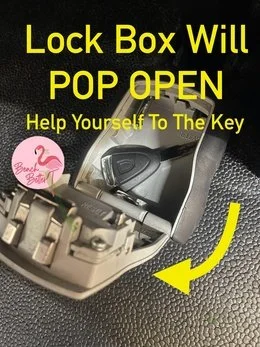
- Slide the black button down. The lid pops open and the key is inside.
No code yet?
Codes are texted and emailed to the primary driver when the rental begins, and emailed again the evening before. Check your spam folder first. If you are not the primary driver, ask them for it. We release codes only to drivers who are approved on the agreement.
The key never stays with the vehicle
Never leave the key in the ignition or a cupholder while the vehicle is unattended, not for five minutes outside a shop. Theft is an active problem in tourist areas along the Emerald Coast. Key out, valuables out, parking brake set, every stop.
03
Turn It On And Pull Away
Nothing happens on the first turn of the key except the dashboard waking up. Two things stop most first drives: the key was only turned once, or the tow switch is still in TOW.
- Sit down and buckle up. The seat belt is the first move, not the last.
- Check the tow switch is on RUN. Near the battery compartment under the seat, or on the front passenger side by the glovebox. In TOW the vehicle is dead on purpose.
- Turn the key twice to the right. First turn lights the dashboard. Second turn wakes the drive system.
- Set the direction selector to F or R. Come to a full stop before you ever change direction.
- Ease into the accelerator. Electric torque arrives instantly and quietly. Give it the first hundred feet before you trust your right foot.
- Headlights, turn signals and horn are on the dash and column. Use them on public roads exactly as you would in a car.
It rolls when it is not in gear
There is no park pawl holding you on a slope. Set the parking brake every time you step out, turn the wheels toward the curb on any incline, and take the key with you.
04
Charging The Long Range Pack
The long range pack is the reason people book this one, and it is also the reason people forget to plug it in. More miles between charges is not the same as skipping a night. Standard wall outlet, roughly 8 hours from low to full, plugged in every night and any time it is parked during the day.
- Plug in every night. Even after a two mile run to dinner. Habit beats memory on vacation.
- One outlet per vehicle. Two vehicles on one outlet trips the breaker. If you only have one, stagger the charging.
- Older condo or house, use a clear circuit. Unplug the coffee maker and the TV from that outlet before you plug in.
- Look for the glow at both cord ends. Both should light up. That glow is how you know it is charging and not sitting on a dead outlet.
- The cord rides with you. Leave it under the seat, not in the condo. A flat pack at the east end of 30A becomes a tow at your expense.

Return it at 90 percent or better, plugged in
Electric vehicles come back charged to 90 percent or higher and left plugged in. Under 90 percent is a $100 charge under the agreement. Lithium holds its voltage steady and then falls off quickly at the bottom, so do not treat a low gauge as spare range.
05
Reading The Battery Gauge
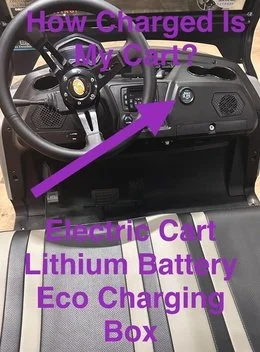
The round ECO Lithium gauge sits above the glovebox on the front passenger side. Lithium reads honest through the whole pack, so what it shows is what you have. Look at it before a long run east or west, not on the way home.
06
Driving County Road 30A And The Miramar Beach Corridor
LNB08L is titled, tagged and insured as a Low Speed Vehicle under Florida Statute 320.01 and 49 C.F.R. 571.500, and Florida Statute 316.2122 allows it on public roads posted 35 mph or less. That covers County Road 30A through Santa Rosa Beach and Scenic Gulf Drive through Miramar Beach and Destin. With this pack, 30A is the drive people actually take.

What 30A actually throws at you
- Bicycles and pedestrians everywhere. 30A runs through one beach community after another, and cyclists, joggers and families with strollers use the shoulder and the crossings constantly. Assume someone steps out at every crosswalk.
- The paved trail beside the road is not for you. The Timpoochee Trail running alongside 30A is a bike and pedestrian path. Trails, sidewalks, dune walkovers and the beach are all off limits to a Low Speed Vehicle.
- Sandy shoulders and narrow lanes. The edge drops off into soft sand in long stretches. Stay in the lane, and if a wheel does leave the pavement, ease off and come back gently instead of yanking the wheel.
- Roundabouts and blind community entrances. Yield early, signal, and do not try to keep pace with a car through a circle.
- Parking. Marked spaces only. Never block a bike lane, crosswalk, walkover, hydrant or driveway. Set the parking brake every time.
Off limits, no exceptions
US-98, also called Emerald Coast Parkway, is off limits at every point, including crossing it anywhere other than a legal signalized intersection. Sidewalks, the Timpoochee Trail, beach walkovers, dune trails and the sand itself are off limits too.
Not every community on 30A allows rentals
Communities set rules on top of state law. Seaside, Rosemary Beach, WaterColor, WaterSound, Alys Beach and Sandestin prohibit rental vehicles. The ones that welcome them include Seagrove Beach, Blue Mountain Beach, Dune Allen Beach, Seacrest Beach, Grayton Beach, Cypress Dunes, Topsail Village and Village of Sugar Beach. Check your address on the Neighborhood Rules page before you plan a drive, and follow any posted gate, guard or path rule once you are there.

07
Night Glow Lights
Power the vehicle up first, key turned until the dashboard lights. The small silver remote is tethered by a cord to the dashboard. Press Power and the glow system comes on.
- Mode cycles the effects: solid, seven running modes, pulse, scan, strobe, fade, S.O.S, music modes and voice modes.
- Color steps through red, hot pink, pink, purple, orange, yellow, green, teal, blue, white, color cycle and color fade.
- Speed sets how fast an effect runs, five levels.
Nothing lights up?
Find the black switch with the blue indicator low on the dashboard and flip it ON. That switch feeds the glow system. If it is still dark, confirm the dashboard is lit by turning the key. Leave the other toggle switches where they are.
Glow lights are decoration. They are not headlights and they do not replace them. Headlights, tail lights and turn signals are what make you legal and visible after dark, and 30A after sunset is full of walkers in dark clothing.
08
Bluetooth Sound
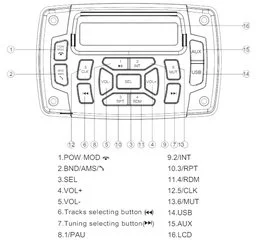
Turn the key to on. Open Bluetooth on your phone and select this vehicle's speaker from the list. Once it pairs, play from your phone as usual. Keep the volume low enough to hear traffic, sirens and the people crossing in front of you, and bring it down through residential streets at night.
09
The AirTag On Board
Every vehicle in the fleet carries an Apple AirTag that cannot be removed. It is how we find you quickly when you need help. If your iPhone alerts you that an unknown AirTag is traveling with you, that is ours, and the unit ID is LNB08L, the same number printed on the windshield.
10
Start Of Your Rental, And Getting It Back To Us
The vehicle is clean, charged and ready by your reservation start time, and we will let you know if it lands a little early. Deliveries are routed by geography rather than by individual reservation times, which is how delivery stays free, so yours may arrive ahead of the scheduled window. When that happens it is yours to use right away. If a property manager prefers otherwise, we park it neatly to the side and out of the way.
At delivery
Walk around it and look it over while the driver is there. Note any scratch, scuff or cosmetic mark and confirm it is on the condition record before the driver leaves. Anything documented at delivery cannot come back at you on return. Every vehicle is also photographed before it leaves the shop.
At the end
- Charge it to 90 percent or better and leave it plugged in. Under 90 percent is a $100 charge.
- Put the key back in the lockbox and scramble the digits. The cord goes back under the seat.
- Text (850) 830-4699 when it is ready. We arrive at the end of the rental or shortly after, depending on the driver's route that day.
Costs worth avoiding: a lost key or remote is $50, a missing charging cord is $50, a stranded tow is $200, a late return runs $100 per hour, and any citation is passed through plus a $35 administrative fee. Everything else is in the Terms, Conditions and Policies.
11
If Something Is Not Right
It will not charge
If the cord ends are not glowing, check the breaker first. A tripped GFI is the usual answer. Reset it, replug, retry. If the breaker is fine and it is still dark, unplug, count to thirty, and plug back in. Charging more than one vehicle means one circuit each.
It will not turn on or will not move
Check the tow switch is on RUN, not TOW, near the battery compartment under the seat or on the front passenger side by the glovebox. Then turn the key twice to the right. Make sure the parking brake is released and the direction selector is in F or R.
You are further out than you meant to be
If the gauge is dropping faster than the miles left in your plan, turn around early and text us. A tow back is $200. A phone call before you are stranded is free.
Anything that feels unsafe
Stop driving, park somewhere safe and legal, and text us. Do not keep driving on a soft tire, a pull in the steering, a brake that feels long or a warning on the dash.
Send a photo before you type a paragraph
Nine times out of ten we solve it from a quick photo or a ten second video. It is the first thing we will ask for, so lead with it.
12
Questions Renters Ask About LNB08L
Should you leave the key in a golf cart when it is parked?
Never. Do not leave the key in the ignition or a cupholder while the vehicle is unattended, no matter how briefly. Theft is an active problem in tourist areas along the Emerald Coast. Take the key, take your valuables, set the parking brake, every single stop.
What should you inspect when a rental golf cart is delivered?
Walk around it with the driver and look at the tires, seats, belts, lights and body. Point out any scratch, scuff or cosmetic mark and confirm it is on the condition record before the driver leaves. Anything documented at delivery cannot be charged to you at return, and every vehicle is photographed before it leaves the shop.
Can you drive a golf cart the length of 30A?
You can drive a street legal Low Speed Vehicle on County Road 30A, which is posted at 35 mph or less. Plan around charge, bicycle and pedestrian traffic, and the fact that several communities along the route prohibit rental vehicles. Stay off the Timpoochee Trail beside the road, and never use US-98 to shortcut between points.
Is LNB08L street legal in Florida?
Yes. LNB08L is a Low Speed Vehicle under Florida Statute 320.01 and 49 C.F.R. 571.500, carrying Florida plate FTJT26, a VIN, a title, current registration and insurance. Florida Statute 316.2122 permits it on public roads posted 35 mph or less. It is never permitted on US-98.
Who is allowed to drive it?
Only drivers who are 22 or older, hold a valid driver license, carry their own active auto insurance, and are listed and approved on the signed rental agreement before the rental begins. Two drivers are included and each additional driver is $15, approved online in advance. Lockbox codes go only to approved drivers.
Can a street legal golf cart roll over?
Yes. A Low Speed Vehicle weighs a fraction of what a passenger car weighs, runs on a narrow track, and sits higher when it is lifted, so it tips rather than slides. The sideways force in a turn climbs with the square of your speed, which is why turning too fast, swerving suddenly, or catching a curb or soft edge mid turn are the three common causes. Slow down before the turn, straighten the wheel before accelerating, and keep every rider seated and belted.
How long does the long range lithium battery take to charge?
About 8 hours from low to full on a standard wall outlet. A longer range pack means more miles between charges, not fewer nights on the cord. Plug in every night and check that both cord ends glow.
Which 30A neighborhoods allow golf cart rentals?
Seagrove Beach, Blue Mountain Beach, Dune Allen Beach, Seacrest Beach, Grayton Beach, Cypress Dunes, Topsail Village and Village of Sugar Beach are among the communities that allow them. Seaside, Rosemary Beach, WaterColor, WaterSound, Alys Beach and Sandestin prohibit rental vehicles. Beach Better will not confirm a reservation into a community that prohibits them.
 Add On
Add A Storage Box
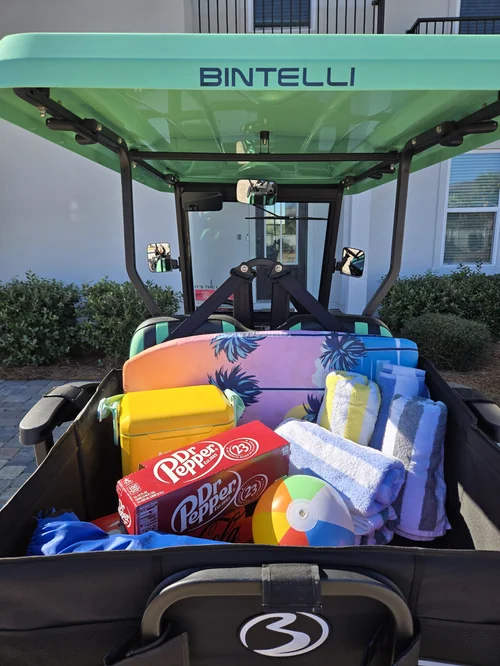
Chairs, towels and coolers ride in the back instead of on laps. Add it online, no stop at the store.
Add Storage Add On
Add A Driver
Two drivers are included. Each additional driver is $15 and signs online, before they drive.
Add DriverText (850) 830-4699 with any question before you drive. We are at 76 N Holiday Rd, Miramar Beach, FL 32550, next to the Cumberland gas station, and at Rentals@alwaysbeachbetter.com.