
RB78 — Luxury Red 6-Seat Electric Golf Cart
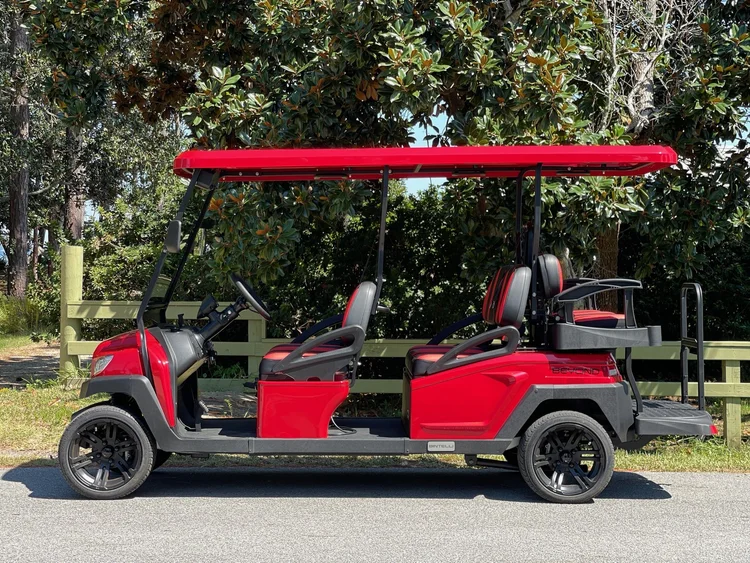
Bold red and hard to miss. This 6-seat electric LSV charges overnight on a standard outlet and arrives ready with LED party lights and Bluetooth sound. Licensed for public roads throughout Okaloosa and Walton Counties.
Getting the cart key
Lockbox Codes
Lockbox codes are sent only to authorized, approved drivers. If you don't have a code, contact your group's primary driver.
Primary drivers: your code was texted and emailed when the rental began, plus emailed again the evening before. Check spam if you don't see it.
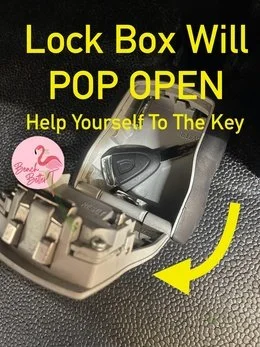
- Look under the driver's seat. The lockbox is mounted underneath, accessible from the middle row. Lift the seat cushion to reveal it.
- Enter the 4-digit code. Line up the digits, then slide the black button downward. The lockbox pops open and your key is inside.


When your rental begins
We'll have it clean and ready by the start time of your reservation. We'll holler if it's ready a smidge early.
If you're getting delivery: due to the high volume of deliveries and pickups we manage daily, your golf cart may arrive earlier than your scheduled delivery time. If this happens, you're welcome to start enjoying it right away.
We cannot delay deliveries based on property manager preferences. In such cases, the LSV will be parked neatly to the side, out of the way. To maintain our schedule and keep prices competitive, we route our drivers based on geographic efficiency rather than individual reservation end times.
Charging your cart
Plug in every night. That's the rule. A standard wall outlet does the job. About 8 hours from low to full. Plug in whenever the cart is not in use, including during the day.
- Plug in every night. Even after a short drive. Habit beats memory.
- One outlet per cart. Two carts on one outlet trips the breaker. Stagger charging times if you only have one.
- Older condo? Use a dedicated circuit. If your rental was built 5+ years ago, unplug the coffee maker and TV from that outlet.
- Charging cord rides with you. A flat battery on the wrong end of 30A means a tow back at your expense.
- Look for the glow on the cord ends. Both should light up when plugged in. That's how you know it's actually charging.
Before you walk away

Never walk away after plugging in unless you've confirmed both cord ends are lit. If they're dark, your outlet is bad — unplug and try a different one.
The 50% Rule
A cart drops from 50% to zero much faster than from 100% to 50%. Don't leave the rental at less than half. Plan ahead.
Reading the battery
Trojan lead-acid battery. The meter sits near the steering wheel and shows your current charge. It does not display an increase while charging — so don't be alarmed if the level looks the same mid-charge. The reading updates once charging completes.


Night drive glow lights
Light up your evening drives with the party glow system. Power up the cart first (key in ignition until the dashboard lights up), then locate the small silver remote control attached by cord to your dashboard. Press the Power button to activate.
Remote control
Mode cycles through lighting effects: solid illumination, 7 running modes, pulse, scan, strobe, fade, S.O.S, music modes, and voice modes.
Color selects from red, hot pink, pink, purple, orange, yellow, green, teal, blue, white, color cycle, and color fade.
Speed adjusts effect speed across 5 levels.
Lights won't turn on?
Check the blue-light switch — low on the dashboard, black switch with a blue indicator. Flip it to ON. If still nothing, verify the dashboard is lit (turn the ignition key). Don't adjust other toggle switches — they control power to the glow system.
Bluetooth speakers
Turn the key to 'on'. Open your phone's Bluetooth menu and select your cart's speaker. Once paired, you can play music directly from your phone.
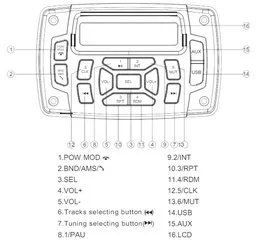
Bintelli Beyond sound system — quick reference guide.
About the AirTag
Your rental has an Apple AirTag installed which cannot be removed. This helps us locate and assist you faster if you need help. This cart's ID is RB78 — that number is also printed on the windshield. If your phone shows an AirTag alert, you can use it to confirm the tracker is ours, not someone else's.
When you're done
- Secure the key in the lockbox. Place the key inside and scramble the numbers.
- Text us when it's ready for pickup. Text (850) 830-4699. We'll be there when the rental ends or shortly after, depending on the driver's route.
Common questions
Can you choose between a gas or electric rental golf cart?
Yes. Beach Better offers both gas and electric rental carts, and the choice is yours at booking. Electric carts are quieter and require only a standard overnight plug-in at your rental property. Gas carts have unlimited range and refuel at any gas station — ideal for renters who plan to drive extensively or are uncertain about charging access. Both cart types include the same features: Bluetooth speakers, LED glow lights, seat belts, windshield, and a Florida plate.
What is included in every Beach Better golf cart rental?
Every Beach Better rental cart includes Bluetooth speakers, LED underglow party lights, headlights, taillights, turn signals, mirrors, seat belts, a windshield, a valid Florida plate, a VIN, and a clean title. No features are upcharged as add-ons — what you see in the listing is what arrives at your door.
What questions should I ask before booking a golf cart rental?
Before booking, confirm that golf cart rentals are permitted in your specific neighborhood, that the cart size fits your group, whether you need gas or electric, what is included in the rental price, and what the cancellation and damage policies are. Beach Better's rental listing pages answer all of these questions in advance — and if anything is unclear, texting (850) 830-4699 gets a real answer fast.
Common user errors
Cart won't charge
If the cord ends aren't glowing, check the breaker — a tripped GFI is the usual culprit. Reset, replug, retry. If the breaker's fine but still nothing, unplug, count to 30, and plug back in. Charging multiple carts? Each one needs its own circuit.
Cart won't turn on or move
Check the tow switch — it must be on RUN, not TOW. Look near the battery compartment under the seat, or the front row passenger side near the glovebox. Then turn the key twice to the right: one turn lights the dashboard, two turns wakes the cart.
Want to add anything?
Storage box
A storage box mounts to the back of the cart and holds a cooler, beach towels, sunscreen, and toys for the whole group. Add it to your reservation any time before pickup — no need to come by the store. Add a storage box online.
Extra driver
Adding a second driver is $15 per additional person. Each driver signs the online agreement before getting behind the wheel — no calls, texts, or store visits required. Sign the extra driver agreement.
Still stuck? Snap a pic before you text.
Nine out of ten times we can solve it from a quick photo or 10-second video. The first thing we'll ask for is exactly that — so save yourself a step and send it first.