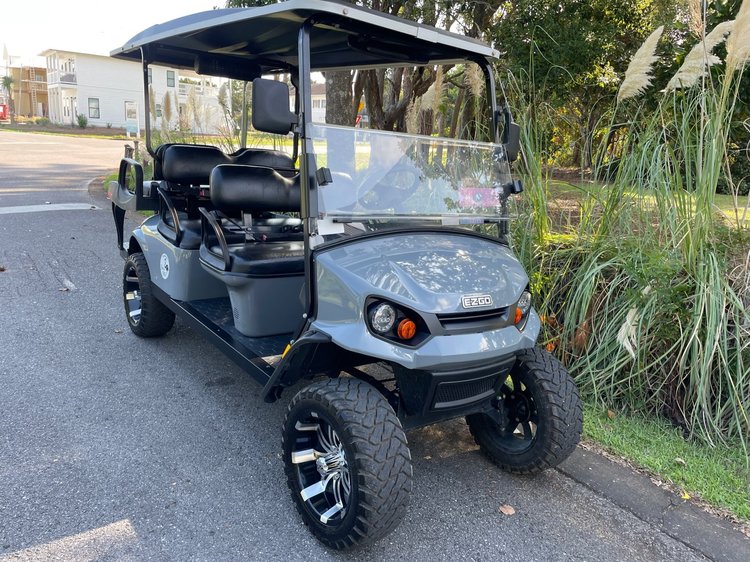
presenting SZ22 - Your Lifted Slate 6-Seat Gas-Powered Golf Cart

Elevated Unlimited-Range Gas LSV with Party Lights & Soundbar for Extended Group Adventures

SZ22 Beach Better Golf Cart LSV Rental

Lifted Features & Gas-Powered Reliability

Unlimited Range & Enhanced Highway Views

Presenting SZ22, your luxury lifted slate 6-seat gas-powered golf cart! This elevated E-Z-GO low speed vehicle features Bluetooth soundbar and after-dark party lights, delivering gas-powered freedom for all-day family road adventures throughout Okaloosa and Walton Counties. Quick refueling provides unlimited range for continuous coastal exploration.

Beach Better Company Logo

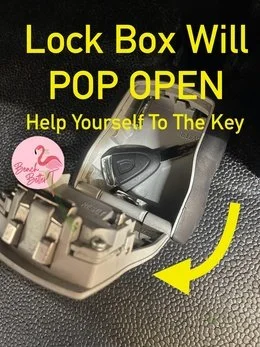
GETTING CART Key OUT OF LOCKBOX

STEP 1: FIND IT ABOVE GAS TANK

Using the armrest, pull the middle row seats upward.

You'll see the lockbox positioned above the gas tank.

STEP 2: HOW TO OPEN LOCKBOX

Enter 4 digit code

Line up the four digits, then slide the black button downward. The lockbox will pop open, revealing your key inside.

What’s the code? We've emailed it to all approved drivers in your group the day before your rental began and again on your rental start date. You also received it via text when your cart rental began.

————————————

📋 Refueling CArt Before Returning | Fill Up With 87 Unleaded

When it's time to return your street legal gas-powered golf cart rental, top off the tank with 87 Unleaded.

  • Want to skip the stop? Text 850-830-4699 to add Prepaid Fuel for $18.50 and we’ll refill the tank for you.

  • Returns without fuel and no prepaid option will incur a $30.00 refueling fee.

————————————

⚠️ GENTLY TURN THE KEY | NEVER FORCE IT

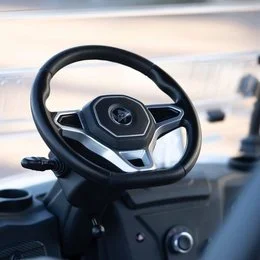
The ignition accepts the key in only one orientation. Forcing it in upside‑down and turning it may cause it to break off, leaving you unable to start the vehicle. If it resists turning, remove it and reinsert properly.

————————————

nIGHT DRIVE GLOW LIGHTS

Light up your evening drives with your cart's party glow system. Customize colors, modes, and speeds to match your vibe.

1. Power up your cart
Insert key into ignition and turn until dashboard lights up.

2. Activate the glow system
Locate the small silver remote control (attached by cord to your dashboard) and press the Power button.

3. Customize your glow
Use the remote to adjust colors, modes, and glow speeds. Create your perfect atmosphere—vibrant or chill!

WIRELESS Remote Control Buttons

The Power Button turns your system on and off.

The Mode Button cycles through lighting effects including Solid Illumination, 7 Running Modes, Pulse Mode, 3 Scan Modes, 3 Strobe Modes, 3 Fade Modes, S.O.S Mode, 4 Music Modes, and 4 Voice Modes.

The Color Button lets you choose from Red, Hot Pink, Pink, Purple, Orange, Yellow, Green, Teal, Blue, White, Color Cycle, and Color Fade.

The Speed Button adjusts effect speed across 5 speed levels.

Special Functions

Enable Auto On/Off Function
Press and hold down the Mode and Color buttons on the control box. After the teal color lights up, turn on the kit and test for functionality.

Disable Auto On/Off Function
Press and hold down the Mode and Speed buttons on the control box. After the orange color lights up, turn on the kit and test for functionality.

Troubleshooting

Lights won't turn on?

Check the blue-light switch by looking low on the dashboard for a black switch with a blue indicator light. Flip it to the ON position, as someone may have accidentally bumped it off.

Still not working?

Verify your dashboard is lit (if not, turn the ignition key). Don't adjust any other toggle switches on the dashboard—they control power to the glow system.

Contact us if issues persist: (850) 830-4699

————————————

🛎️ AirTag on your rental

To ensure a smooth rental, each vehicle includes a fixed Apple AirTag. If your phone notifies you, simply check the windshield ID to confirm it’s our cart.

Benefits of AirTag Tracking:

  • Quick Support: If you need help, we can locate and assist you faster.

  • Enhanced Security: Ensures your rental experience is smooth and worry-free.

BLUETOOTH SPEAKERS

————————————

🎶 BluetooTh SOUNDBAR MANUAL | GAS RENTAL

  • Turning On: Start the cart, then press and hold the power button on the soundbar with your finger until you hear "Speaker on, ready to connect." (Note: There is no remote control for the soundbar)

  • Turning Off: Briefly press the power button with your finger to shut down the soundbar.

Bluetooth Connection

  • Pairing Your Phone: Open your device's Bluetooth settings and select "EcoXGear SE-18" to connect.

Understanding the LED Indicators:

  • Flashing Blue: Pairing mode active

  • Solid Blue: Successfully connected and ready to play

Volume Adjustment

  • Changing Volume: Lightly tap the volume buttons on the soundbar to adjust up or down. Press and hold to continuously raise or lower the volume to your preferred level.

Glow Light System

The soundbar’s lighting operates independently from the wheel‑well and underbody lights controlled by your key fob. Both systems work together for maximum party effect!

  • Front-Facing Party LED Lights: Press the double‑sunshine icon to activate and cycle through colors or pulse effects.

  • Rear LED Light Strip: Press the adjacent button to turn on the rear strip light.

Additional Features

  • Mode Button: Briefly press to cycle through: Bluetooth → EcoCast Transmitting → EcoCast Receiving → FM → AUX-IN

  • EcoTalk Voice Assistant: Press and hold for 3 seconds to activate your device's voice assistant (Siri, Google Assistant, etc.)

EcoXGear BT Soundbar User Guide

For complete specifications and troubleshooting, refer to the manufacturer's full user guide. SOUND SYSTEM CHEAT SHEET

WHEN YOUR RENTAL IS BEGINNING

🔐 LOCKBOX & KEY: Approved drivers will get the lockbox code twice—first the day before your rental, and again the moment your cart is prepped and ready to roll.

TIMING: Your cart will be cleaned, charged, and waiting right at the start time of your reservation. If we wrap things up ahead of schedule, we’ll let you know.

GETTING DELIVERY? We handle a high volume of daily deliveries and pickups, so your cart may arrive earlier than the time listed on your reservation. If it does, go ahead and start enjoying it right away. We’re not able to delay deliveries based on property manager preferences, so the LSV will be parked neatly off to the side—never in the way of turnover activities. Our routes are planned for efficiency so we can keep prices fair and serve many families each day. Thanks for your flexibility and for riding with us! 🌞

WRAPPING UP YOUR RENTAL

1. Place the key in the lockbox and rotate the numbers to secure it.

GAS: Fill up with 87 Unleaded. If you don’t, we’ll refuel it and charge $30 to the primary renter. Text (850) 830-4699 to add Prepaid Fuel at a discount.

2. Text (850) 830-4699 when the cart is ready. Pickup timing depends on the driver’s route but will be at or after your end time.

————————————

✏️ Get Approved As A Driver | SIGN RENTAL AGREEMENT

Driver Requirements

  • Age 22 or older

  • Have a valid driver's license

  • Have active auto insurance that lists them as insured by name

  • Successfully signed their Rental Agreement

Where to Locate Your Rental Agreement

Quick Tip: A link to your personalized Rental Agreement was emailed to you right after the primary renter placed the reservation sent via Adobe sign. If you don't see it, check your spam folder. Responding quickly to our request would thrill us! If you decided you don't want to drive, text 850-830-4699.

Benefits of Signing Quickly:

  • Faster Approval: Get on the road sooner and start enjoying your beach getaway

  • Peace of Mind: Ensure all drivers are approved and ready to go without last-minute hassles

  • Smooth Experience: Avoid any potential delays or issues with your rental

More Drivers?

Traveling with a big group? Awesome! You're welcome to add unlimited extra drivers to your reservation for +$15 per additional driver. Your booking includes a primary and optional second driver at no extra charge.

Want to add more? Just have the additional driver fill out this Rental Agreement: CLICK HERE TO REGISTER AN ADDITIONAL DRIVER

Once they complete the Rental Agreement, we'll review it and, upon approval, add them to your reservation. Let's make sure everyone gets a turn to captain the vehicle.

————————————

⭐ CART-FRIENDLY AREAS

Check with your property manager to ensure your neighborhood or resort permits Beach Better gas and electric rental carts before placing your reservation. We do our best to ensure your fun, but ultimately, ensuring your rental neighborhood allows for golf cart rentals is your responsibility.

  • Many HOAs allow property owners to loan their carts to their guests but some do not allow guests to rent carts from outside providers.

  • To review which neighborhoods we know do not permit rental carts, click here. Obtain confirmation from your property manager in writing that a Beach Better low speed vehicle cart will be welcome at your condo or resort. ⚠️ Caution: If you rent a cart that you're unable to use due to HOA restrictions, the cancellation policy will apply.

Bottom line: A quick call or email to your property manager now can save you hassle later. Let's make sure your cart is welcome before you book.

————————————

🐟 FREQUENTLY ASKED QUESTIONS

VIEW FAQS

————————————

🦀 ABOUT US

We're a family-owned & operated small business run by two sisters that traded corporate cubicles and Wisconsin blizzards for Florida sunshine and sandy toes over a decade ago. Your support keeps our dream alive on the Emerald Coast. We're here to make your beach trip unforgettable with safe, modern street-legal low speed vehicles and genuine hospitality. No corporate script—just real people who care about your family.

We genuinely appreciate your business and hope you had a fantastic experience!

THANK YOU.

Previous
Previous

OZ46 Lifted Ocean Blue 6-Seat Gas Cart

Next
Next

SZ51 Lifted Silver 6-Seat Gas Golf Cart